Protect margins
real-time engagement profitability
Compare revenue with cost on every engagement, including fixed-fee work, while there is still time to act.

Run a More Profitable Practice.
Know which engagements make money, where your team has capacity, and how your firm is performing—in real time.
For CPA & Consulting Firms
Book a Personalized DemoWho this is for
real-time engagement profitability
Compare revenue with cost on every engagement, including fixed-fee work, while there is still time to act.
better staff utilization
See available hours by person and department, so work is assigned to capacity rather than to guesswork.
consolidate the technology stack
One system for time, WIP, billing and reporting replaces the tools you pay for and maintain separately.
real-time operational visibility
Trend revenue, profit and utilization together, with prior-year comparison, whenever the question comes up.
A lower-cost tool that provides next-generation technology other practice management software doesn’t offer — live engagement profitability, staff utilization, WIP and firm analytics from one ledger, without an enterprise price tag.
Book a demonstration now and see your own engagements, staff and margins on the screen.
Book a Demonstration NowTeamwork
Monitor engagement performance, including fixed-fee work.
Understand capacity and allocate resources more effectively.
Connect time, expenses, and billing workflows.
Turn operational data into actionable decisions using demonstrated AI capabilities.
Compare subscription fees, administration time, duplicate tools, and implementation costs—not just the price per seat.
Your numbers. A clearer comparison.
Estimates in USD. Monthly costs × 12, plus first-year implementation. Enter duplicate-tool fees separately from subscriptions to avoid double counting.
CPA & Consulting firm buyer’s guide
For a CPA or consulting firm, practice management software is the layer that connects time entry, engagements, billing and reporting. Generic project management tools can track tasks, but they rarely understand the accounting-specific loop: staff log hours, hours become WIP, WIP becomes invoices, and invoices feed profitability and utilization reports.
The best systems keep that loop in one database, so a partner reviewing client profitability sees the same hours that the WIP report and the staff utilization page use. When the numbers disagree, the argument is usually about the spreadsheet, not the business decision.
Evaluation criteria
Use these six areas to score every platform. The vendors that rank for "best accounting practice management software" usually differ most on depth in these categories.
Fast entry from anywhere, with approval workflows that keep timesheets moving before month-end close.
Budgets, due dates, status flags and at-risk alerts across every service line — from tax to advisory.
Unbilled hours, WIP aging and one-click invoicing so work in progress turns into cash faster.
Revenue versus cost by client, effective rate and margin against target — not just billable hours.
Utilization, billable hours and revenue per person by department, office and level.
Trended revenue, profit, realization and department mix with prior-year comparison.
Comparison snapshot
This table pairs each capability with the question to ask on a demo, then shows how Practice Ledger answers it. Evaluate the other vendors on the same questions.
| Capability | What to ask | Practice Ledger |
|---|---|---|
| Time capture | Can staff enter time from any screen, with manager approval queues? | Yes — fast entry plus an approvals queue. |
| Engagement budgets | Can you see budget used, hours logged and at-risk flags in one table? | Yes — 1,061+ engagements tracked by status and budget burn. |
| WIP visibility | Can you rank unbilled work by client and age, then invoice from the report? | Yes — WIP report with aging and generate-invoice actions. |
| Client profitability | Can you compare revenue to cost and flag clients below target margin? | Yes — revenue vs. profit by client with margin targets. |
| Staff utilization | Can you drill from a firm-wide utilization list into a person-level profile? | Yes — list view + peer comparison on every profile. |
| Firm analytics | Can you trend revenue and profit with prior-year comparison and department mix? | Yes — revenue & profit trend, department breakdown and realization metrics. |
| Role-based access | Can you scope dashboards and reports by partner, manager and staff roles? | Yes — permissioned views managed from the admin console. |
Firms also evaluate Oracle NetSuite (ERP with project and resource modules for services firms), Karbon (Workflow and collaboration for accounting firms), Financial Cents (Workflow and task management for small firms), Mango Practice (Practice management and accounting software) Apply the same capability questions above and confirm which data is live versus batch-exported from another system.
Inside the platform
Click through the modules to see the real screens partners use — no signup required.
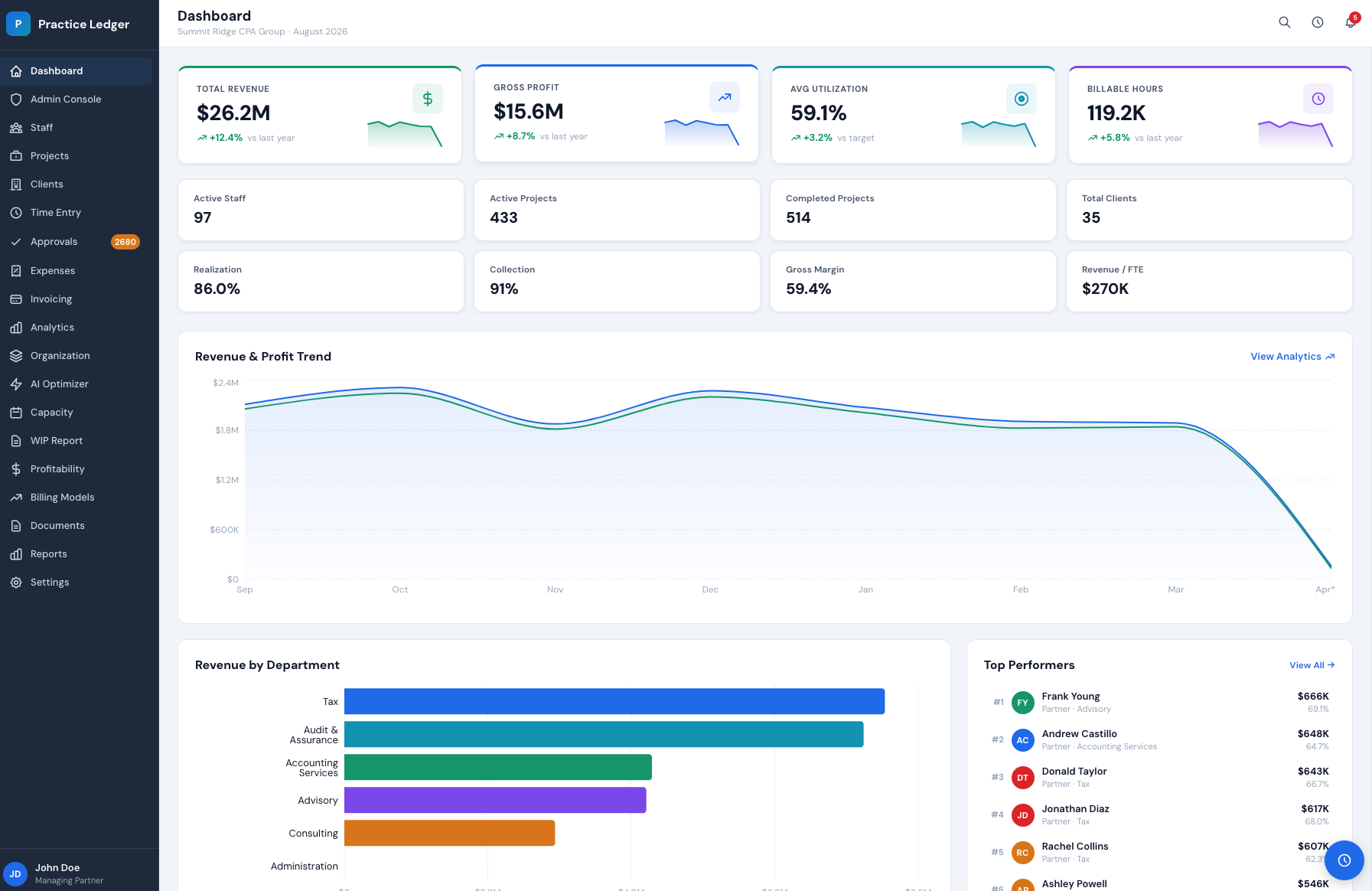
Revenue, gross profit, utilization, billable hours and realization sit on the first screen. Trend sparklines show direction before you open a report.
Sneak peek
A short walkthrough of the Staff Utilization view: sorting 100+ timekeepers by utilization, billable hours and revenue, then drilling into a profile for rate, YTD revenue and peer comparison.
The best accounting practice management software for your CPA or consulting firm is the one your team will actually use. Run each option through this three-step filter before signing a contract.
Map your current time, WIP, billing and reporting flow. The gap you want to close is usually the missing report, not the missing feature.
Ask the vendor to walk through a real engagement, a real staff member and a real client. Screenshots are proof-of-concept; your data is proof.
If profitability, WIP and utilization come from three different exports, the math will argue. Pick the system where the reports read from the same ledger.
Most firms shortlist three platforms. These pages cover the rest of the comparison.
Time entry, expense capture, WIP, invoicing and realization in one firm ledger.
Read moreLive utilization, billable hours and revenue per person, with staffing recommendations.
Read moreSeat pricing, annual discounts, and an ROI calculator for your headcount and billing rates.
Read moreSee engagement profitability, team capacity, and firm performance mapped to your service lines and billing models.